That second scenario is becoming standard at conferences, campaign events, and corporate check-ins across the country. But QR code badges only work if they're designed and printed correctly. A blurry code, a low-contrast background, or a code creased by a lanyard clip can turn a smooth check-in into a bottleneck of frustrated attendees and irritated volunteers.
This guide covers what QR code badges actually are, why organizations are switching to them, how to design one that scans on the first try, which materials hold up best, and how to get a batch printed without last-minute surprises.
Key Takeaways
- QR badges cut check-in time to seconds and eliminate manual attendee lookups
- High contrast, correct sizing, and a clear quiet zone determine whether a badge scans on the first try
- Matte-laminated or PVC materials scan more reliably than glossy stock under bright venue or outdoor lighting
- Dynamic QR codes let organizers update session details or access rules without reprinting badges
- Build in lead time for bulk badge proofing, variable data printing, and material selection
What Are QR Code Badges?
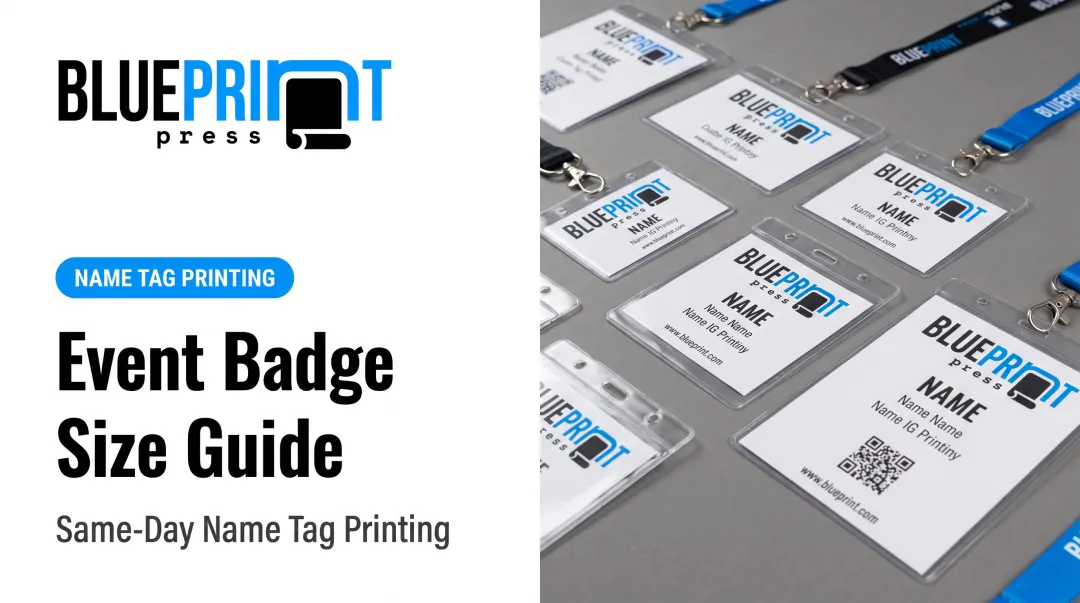
A QR code badge is an ID, event, or access badge with a scannable QR code printed on its surface. Instead of checking names and faces against a printed roster, staff or attendees scan the code to pull up registration status, access level, or contact details instantly.
Types of Information a QR Code Badge Can Hold
A single code carries far more than a name and title. Common uses include:
- Contact details or a vCard that saves straight to a phone's contacts app
- Event registration ID tied to a live database record
- Ticket tier or access level, such as VIP, exhibitor, or staff
- Session agenda or personal schedule for multi-track conferences
- Social profiles or portfolio links for networking-heavy events
That range of uses is possible because QR codes hold far more data than older badge tech. Traditional barcodes and RFID chips have handled scanning for years, but a QR code can hold roughly 10 times more data in the same physical space than a standard barcode, according to DENSO WAVE, the company that invented the format. One small square can carry a vCard, a ticket tier, and a session schedule at once.
RFID badges also need dedicated readers at every checkpoint, which adds equipment cost and a point of failure if a scanner goes down. QR codes just need a camera. Every modern smartphone can scan one straight from its built-in camera app, no separate app or hardware required.
Benefits of Using QR Code Badges
QR badges do more than look modern on a lanyard. They change how organizers run registration, security, and follow-up.
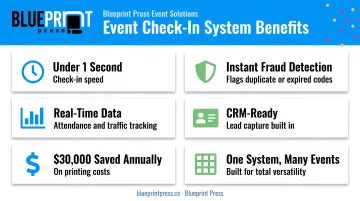
- Confirm registration in under one second with a scan, compared with staff searching a printed list. That gap compounds fast when a few hundred people hit the door in the same fifteen-minute window.
- Flag a duplicate code, expired credential, or wrong access tier the moment the badge is scanned, instead of relying on a visual wristband check. Staff catch problems at the door, not after someone is already inside.
- Tie dynamic codes to a live database to see which sessions filled up, which booths got traffic, and when attendees arrived versus when they registered.
- Let exhibitors scan a badge into a CRM or spreadsheet instead of stacking business cards; attendees get the same swap at a session or booth.
- Cut disposable check-in print—attendee lists, temp passes, excess handouts. When NASPP moved to a scan-driven format, it reduced printing, shipping, and storage costs by $30,000 and 150 staff hours a year.
- Run one setup for a three-day trade show, a canvassing kickoff, a nonprofit gala, or an everyday corporate ID program. The code points to whatever record fits the situation.
How to Design QR Code Badges That Scan Every Time
A badge that looks great but won't scan is worse than no QR code at all. Design choices made before printing determine whether staff spend the event scanning smoothly or squinting at phones.
Placement, Size, and Quiet Zone
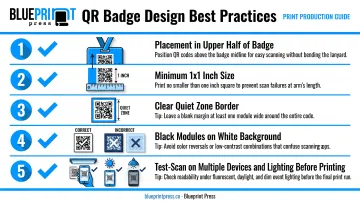
Put the QR code on the front of the badge, in the upper half. Codes placed near the bottom edge get covered by lanyard clips, jackets, or a badge holder's sleeve seam more often than organizers expect.
Size matters just as much as position. Aim for a minimum of roughly 1 inch by 1 inch for codes scanned at close range. The exact minimum depends on how much data is encoded: more data means more modules packed into the same square.
Leave a clear quiet zone—a border of blank space—around the entire code. Crowding text or graphics right up to the edge is one of the most common reasons a code fails to read.
Contrast, Color, and Branding
Stick with dark modules on a light background. Black on white remains the most reliable combination for any scanner or phone camera. Avoid gradients, photo backgrounds, or busy patterns behind the code; they can look sharp on screen but confuse the contrast detection a scanner relies on.
Brand colors and logos can absolutely appear on the badge, just not inside or crowding the code itself. Keep logos, event names, and color blocks in the margins, above or below the code, so the scannable area stays clean.
Static vs. Dynamic QR Strategy
A static code has its destination baked in permanently, which is fine for a single-day event where nothing changes. A dynamic code keeps a stable printed link but redirects to updated content on the back end.
That means organizers can change a room assignment, agenda, or access rule without reprinting a single badge. For multi-day conferences or anything with a schedule that might shift, dynamic is worth the setup.
Before committing to a full print run, scan a sample badge under real conditions:
- Multiple phone models and camera apps
- Direct sunlight and dim hallway lighting
- Close range and a couple of feet away
Catching a scanning problem on one proof sheet is far cheaper than catching it during a check-in line.
Choosing the Right Badge Material for Reliable Scanning
Material choice affects scan reliability as much as design does. A perfectly designed code printed on the wrong stock still fails under bad lighting.
- Prefer matte or non-glare finishes over glossy laminates. Gloss creates glare that hides contrast; matte diffuses light for more consistent scans under bright venue lighting or direct sun.
- Choose PVC or plastic cards for multi-day events. They withstand repeated handling and badge-holder friction over a three- or four-day conference, costing more per unit but surviving intact.
- Use laminated or sustainable paper for shorter events. A one-day conference, gala, or canvassing shift doesn't need plastic durability, and paper keeps costs down while protecting the code from smudging.
- Pick fade-resistant, weatherproof stock for outdoor use. Rallies, festivals, and trade show tents expose badges to heat, humidity, and sun—the same conditions outdoor signage faces.
Blueprint Press already builds weatherproof, UV-resistant materials for outdoor political signage, using coroplast designed to survive a full Arizona campaign season. That same weather-resistance logic applies to badge stock for any event outside a climate-controlled hall.
Common Applications for QR Code Badges
The same core technology adapts to very different settings.
Events and conferences. Registration check-in, per-session attendance tracking, and exhibitor lead retrieval all run through the same badge. One scan replaces a sign-in sheet, a headcount clicker, and a stack of business cards.
Political campaigns and nonprofits. Field teams and fundraisers use QR badges to:
- Confirm which volunteers and canvassers are authorized to knock on doors or staff a table
- Speed donor check-in at galas by pulling a guest's table assignment on scan
- Run credential checks at ballot initiative events
Corporate and workplace settings. Employee ID badges, visitor management at a front desk, and trade show staff credentials all use the same scan-and-verify logic. They simply point at an internal database instead of an event registration system.
Blueprint Press already produces name tags, lanyards, campaign palm cards, and civic engagement buttons for these exact use cases. Adding a QR code to an existing badge order is a natural next step rather than a separate project.
How to Get Custom QR Code Badges Printed
Picking a print partner matters more for QR badges than for most printed materials, because a mistake doesn't just look bad; it stops working. Look for:
- High-resolution digital printing. QR codes need crisp edges on every module. Digital printing holds fine detail more consistently than offset when a code is only an inch across.
- Fast turnaround. Events have fixed dates. A printer that can turn around proofs and a full run quickly leaves more room to catch and fix problems.
- A range of durable materials. PVC, matte-laminated paper, and weatherproof stock should all be options, not just one default badge type.
The Typical Order Process
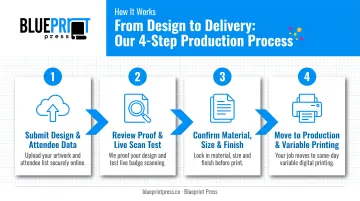
- Submit your badge design and attendee data. Artwork plus a spreadsheet of names, IDs, or other data that populates each unique QR code.
- Review a proof. Check placement, contrast, and at least one live scan test before approving.
- Confirm print specs. Material, size, and finish get locked in.
- Move to production. Bulk or variable-data printing generates a unique QR code per badge without manual work on each one.
That process only works when the printer can execute it cleanly. Blueprint Press runs same-day, union-printed production for most jobs on digital equipment built for sharp, reliable output. As a full-service shop, Blueprint Press can supply badges, lanyards, and the rest of an event's printed materials, from palm cards to canopy tents, from one vendor instead of three.
For organizations running large events or distributing badges to a scattered team, Employee Direct Delivery ships materials straight to staff or attendees rather than to one central office. Orders shipped outside Arizona, across the other 49 states, or into Canada come with real-time tracking, so organizers know exactly when badges will land.
Bulk Ordering Considerations
- Larger runs typically bring the per-badge price down, though material and customization still factor into the final number.
- Lead time grows with list size: a 2,000-name conference badge run needs more turnaround room than a 50-person board meeting.
- Confirm artwork specs and data-file formats before submitting so a correction round doesn't eat into your timeline.
Requesting a project quote, with product type, quantity, and budget range, is the fastest way to get accurate bulk pricing for a specific event.
Frequently Asked Questions
Where can I find ID badges with QR codes?
Digital print shops that handle variable-data printing, like Blueprint Press, can produce ID badges with a unique QR code for every attendee. Compare turnaround time, materials, and bulk pricing before you book.
Can I make a QR code with my logo?
Yes. Most QR code generators let you place a logo or brand colors in the center of the code. Have your printer test-scan the branded version before a full run—heavy branding can interfere with readability.
How do I get a QR code sticker?
A print shop that offers vinyl or adhesive label printing can produce QR code stickers. They’re a quick way to add a code to an existing badge, product, or event sign without redesigning the whole piece.
What is the best material for QR code badges?
Matte-laminated or PVC cards hold up best. They stay durable and scan cleanly without glare, including at multi-day and outdoor events.
Do QR code badges need to be printed in color?
No. High-contrast black-and-white is the most reliable combination for scanning. Brand colors work fine elsewhere on the badge, just not inside or immediately around the code itself.
How much does it cost to print QR code badges in bulk?
Bulk pricing depends on material, quantity, and customization. Request a quote from a union digital print shop for accurate Southwest and nationwide pricing for your event.