Order the wrong size and you'll deal with printer jams, badges that won't fit your existing holders, or credentials nobody can read from six feet away. Many organizations don't discover a sizing mismatch until cards are already jamming in the printer or curling out of a lanyard clip.
This guide breaks down the three standard badge sizes—CR80, CR79, and CR100—along with the thickness, bleed, and artwork specs that determine whether your badge is actually print-ready. We'll also cover the compatibility mistakes that trip up first-time buyers most often.
Key Takeaways
- CR80 (3.375" x 2.125") is the standard size for employee, student, and access-control badges.
- CR79 (3.303" x 2.051") is a compact adhesive-back format made to overlay proximity or clamshell cards.
- CR100 (3.88" x 2.63") runs roughly 42% larger than CR80, built for high-visibility event and visitor badges.
- Size alone doesn't make a badge print-ready: thickness, bleed margins, and printer compatibility matter too.
Understanding ID Badge Size Standards (What "CR" Numbers Mean)
The CR80/CR79/CR100 naming system traces back to ISO 7810, the international standard governing the physical characteristics of identification cards. CR80 specifically matches the ISO 7810 ID-1 format, the same dimensions as standard bank and credit cards. That is why it fits every wallet and card holder on the market.
CR79 and CR100, by contrast, are industry and printer-manufacturer formats rather than ISO-defined sizes. That difference affects which printers and accessories you can use.
Badge size isn't a cosmetic choice. It sets hard limits on:
- Which printers can physically feed and print the card
- Whether existing holders, reels, and lanyards will actually fit
- How legible your logo, photo, and text remain at a distance
Choose the wrong size, and hardware, accessories, and readability all get harder to fix later.
Factors That Influence Which Badge Size You Actually Need
"Standard" doesn't always mean "correct for your situation." A few variables typically override the textbook default:
- Use case: A daily-wear employee badge has different demands than a one-time conference pass. Daily wear needs durability; events need visibility.
- Printer and card-stock compatibility: Not every card printer handles every size. CR100 needs a printer built for oversized cards; most standard desktop models can't run it.
- Existing infrastructure: Card readers, slot punches, and badge holders are built to tight CR-format tolerances. Swap sizes without checking compatibility and something downstream often breaks.
- Industry constraints: Healthcare settings often favor snag-resistant, adhesive CR79 overlays; industrial environments may prioritize break-away lanyards over rigid clips for safety.
- Volume and budget: Standard sizes print faster and cost less than custom dimensions, with no special tooling or setup.
The 3 Standard ID Badge Sizes: CR80 vs CR79 vs CR100
These three formats cover the overwhelming majority of badge programs in the U.S., shaped as much by printer engineering limits as by design tradition.
CR80 – The Standard Badge Size
Dimensions: 3.375" x 2.125" (85.6 x 54mm), typically 30 mil thick.
CR80 is the default for a reason. It's used for:
- Employee IDs
- Student IDs
- Access-control credentials
- Membership cards
Because it matches the ID-1 standard, you get near-universal printer support and wallet/holder compatibility. If you're not sure which size to order, CR80 is almost always the safe answer.
CR79 – Compact Format for Adhesive & Overlay Use
Dimensions: 3.303" x 2.051" (roughly 83.9-84.1 x 51.8-52.4mm, depending on manufacturer). About 2mm smaller per side than CR80.
CR79 is mainly an adhesive-backed overlay that sticks onto a standard CR80 proximity or clamshell card. That lets you print a custom photo ID on top of existing access hardware. It's also popular in snag-sensitive healthcare environments.
One caution: not every printer supports CR79. Some manufacturers offer it only as an optional feed configuration, not a default. Confirm compatibility before you order stock.
CR100 – Oversized Format for Visibility
Dimensions: 3.88" x 2.63" (98.5 x 67mm). That's about 42% more surface area than CR80, per FARGO's HDP600 CR100 printer specifications.
CR100 is built for situations where visibility matters more than pocket-friendliness:
- Visitor badges
- Trade show passes
- Conference credentials
The trade-off: it won't fit a standard wallet and needs larger holders and lanyards. Compatible printers are limited to models built for oversized cards.
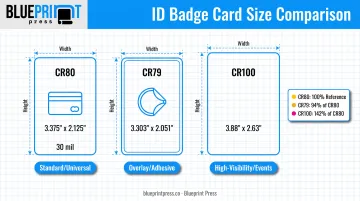
Quick Decision Guide
| If you need... | Choose... |
|---|---|
| Everyday employee or student ID | CR80 |
| Overlay for an existing prox/access card | CR79 |
| High-visibility event or visitor badge | CR100 |
ID Badge Thickness, Bleed & Artwork Print Specifications
Size is only half the spec sheet. Thickness and artwork setup determine whether a badge actually prints correctly the first time.
Thickness Matters More Than You'd Think
Badge thickness is measured in mil (1 mil = 0.001"). Manufacturer data across major card printers shows:
- 30 mil is the standard thickness for durable, everyday-use badges
- 10 mil cards are common for adhesive-backed or overlay formats
- 10–40 mil feed range on most card printers, per Zebra's ZC100 specs (confirm your printer before ordering stock)
Bleed, Margins, and Resolution
Artwork dimensions depend on whether you're printing to the edge:
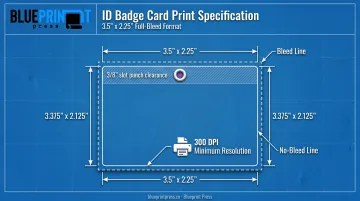
- No-bleed art: exactly 3.375" x 2.125" (the finished card size)
- Full-bleed art: extends outward, commonly to around 3.5" x 2.25", so trimming doesn't leave white edges
- Resolution: 300 dpi minimum; higher dpi helps with fine text and logos
- File setup: submit front and back as separate files, not one combined layout
Slot Punch Clearance
If your badge needs a slot punch for a lanyard, keep critical text and logos clear of the top edge. Most programs use about 3/8" of clearance as a buffer; confirm exact hole placement with your supplier before you lock the file.
Pairing badges with name tags or lanyards? Blueprint Press prints both as custom, union-made pieces for events and organizations across Arizona. Request a quote so badge and accessory specs match in one order.
Common Mistakes & Compatibility Issues to Avoid
Most badge-ordering problems come down to a handful of repeat offenders:
- Assuming every printer supports every size. CR79 and especially CR100 need specific hardware, so confirm your printer's supported formats before you buy cards.
- Treating CR80 dimensions as "close enough." Even small deviations can cause misfeeds or jamming. Printers are calibrated to tight tolerances.
- Ignoring accessory compatibility. Badge holders, reels, and lanyards are sized to specific CR formats, and a CR100 badge won't sit right in a CR80 holder.
- Skipping bleed requirements. Skip the bleed and you risk visible white borders or a cropped logo after trimming.
Conclusion
Badge size drives printer compatibility, accessory fit, and whether your credential actually does its job. CR80 remains the safest default for most programs, while CR79 and CR100 solve specific problems that CR80 can't.
Getting sizing, thickness, and artwork right the first time saves money and turnaround time.
If you're outfitting an event or organization with name tags and lanyards to match your badges, Blueprint Press offers same-day production on most jobs, union-printed materials, and delivery across Arizona and nationwide. Submit a quote request with your project details for sizing and turnaround confirmation.
Frequently Asked Questions
What is the standard size of an ID badge?
CR80 (3.375" x 2.125" / 85.6 x 54mm) is the standard size, matching a credit card. Nearly every ID card printer on the market supports it.
What is a CR79 card and how is it different from CR80?
CR79 is a slightly smaller adhesive-back format (about 2mm smaller per side) designed to overlay proximity or clamshell cards. CR80 is the full-size, universally compatible standard.
What size is a CR100 badge used for?
CR100 (3.88" x 2.63") is about 42% larger than CR80. Event teams use it for high-visibility passes and visitor credentials that need to read clearly from a distance.
What does "mil" mean when describing ID badge thickness?
Mil refers to thousandths of an inch. 30 mil (0.030") is the standard thickness for durable, daily-use badges, while thinner 10 mil stock is common for adhesive overlays.
Do I need to add bleed to my ID badge artwork?
Yes, if you want edge-to-edge printing. Bleed artwork is typically sized around 3.5" x 2.25", while no-bleed designs should match the exact card size of 3.375" x 2.125".
Can I order a custom ID badge size?
Yes. Many print shops can produce custom dimensions beyond CR80, CR79, and CR100 through a project quote. Standard sizes still print faster and cost less, so confirm specs with your supplier before ordering.